Multi-Channel G-code Simulator

Verify multi-channel programs
without unnecessary downtime.

MultiPath CNC Editor simulates both channels simultaneously. It detects synchronization errors, timing conflicts and tool path collisions before they cost you valuable machine time.

Core capabilities

Everything you need for multi-channel machining

Everything you need to prepare, verify and debug a multi-channel program — in one place.

Single and Dual-Channel Simulation
Switch between single-channel and dual-channel simulation as needed. In dual-channel mode, the toolpaths of both turrets are visible simultaneously, in real time.
Sync M-Code Visualization
Synchronization points are highlighted across both channels. See exactly where your program waits — and why.
Fanuc Macro B Variables
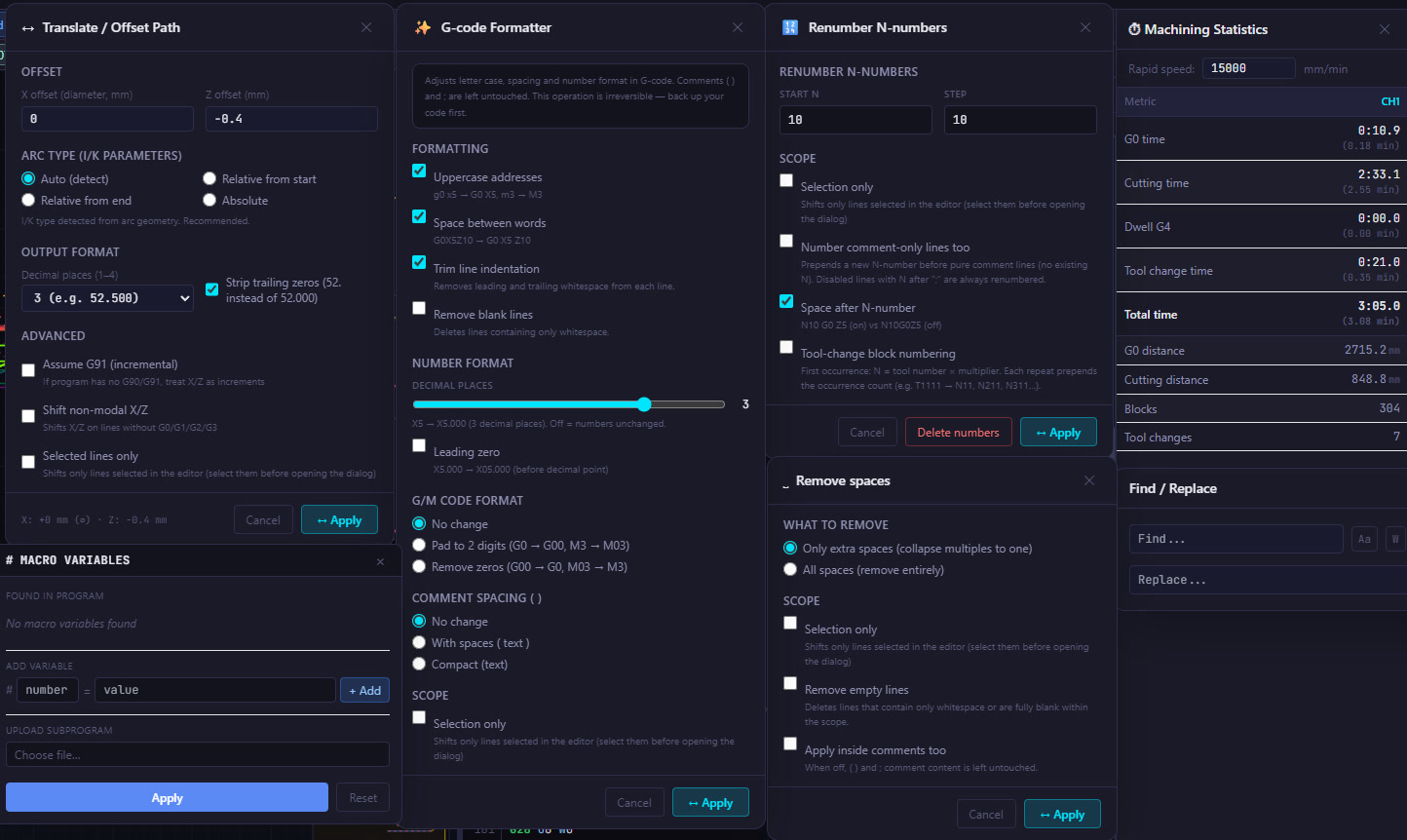
Full Custom Macro B support. Set #variables, evaluate expressions, and simulate parametric programs with real values.
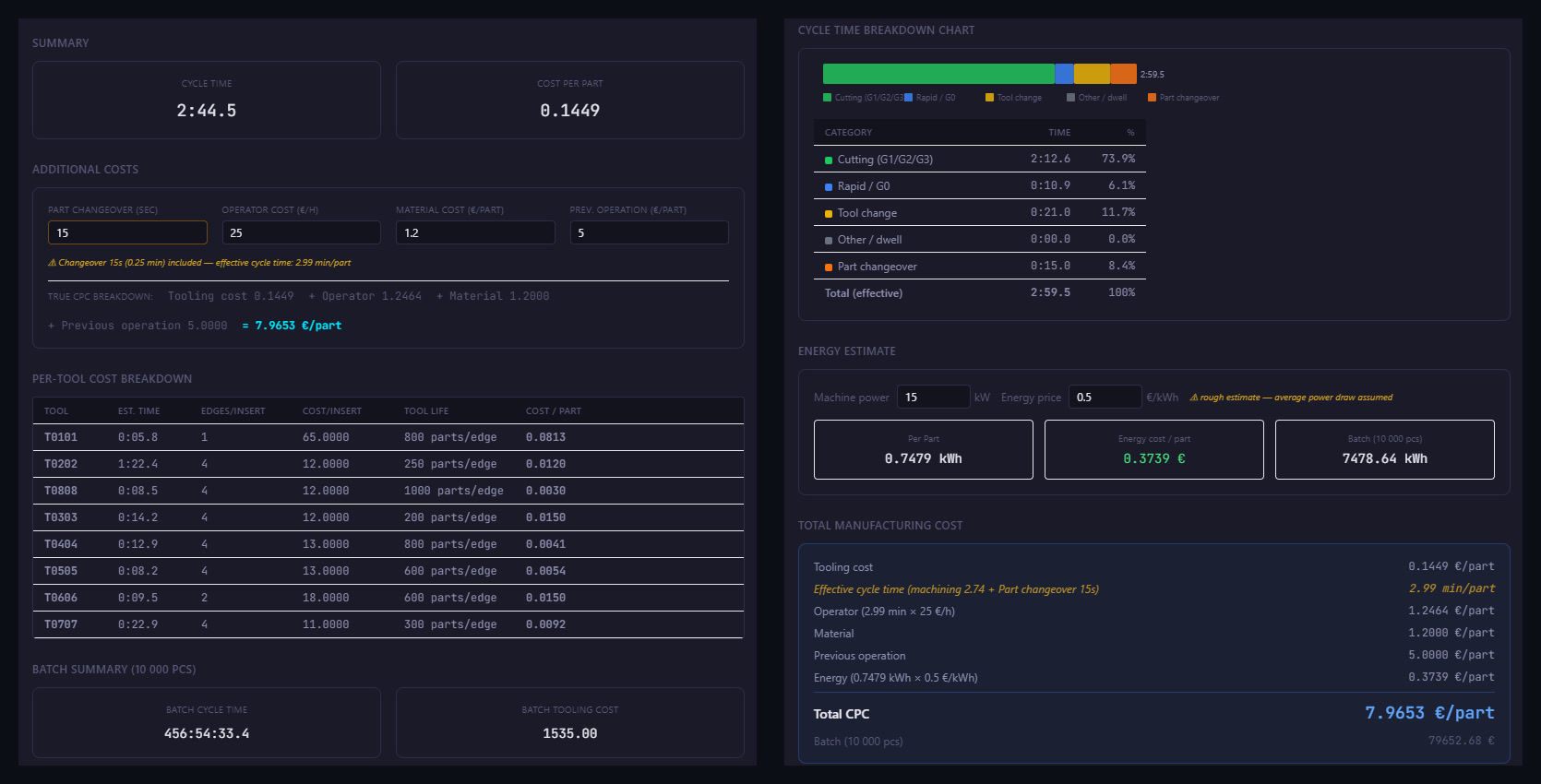
Machining Time Statistics
Estimated cycle time per channel and total program time. Identify which turret is the bottleneck at a glance.
G-code Translate & Offset
Shift, mirror, or offset program coordinates in one click. Handles both R-format and I/K-format arcs correctly.
Machine Configuration & Machine Templates
Channel layout, axis orientation, sync M-codes, and the reference point are all configured to match your machine exactly. Configurations can be saved as templates, letting you define every machine used in your shop.
G-code Check
Automatic program analysis before uploading to the machine. Errors and risks are categorized by severity — from critical to informational.
G-code Diff
Compare the original and modified G-code side by side — in text and in simulation. Changes are highlighted directly in the code and in the tool path visualization.
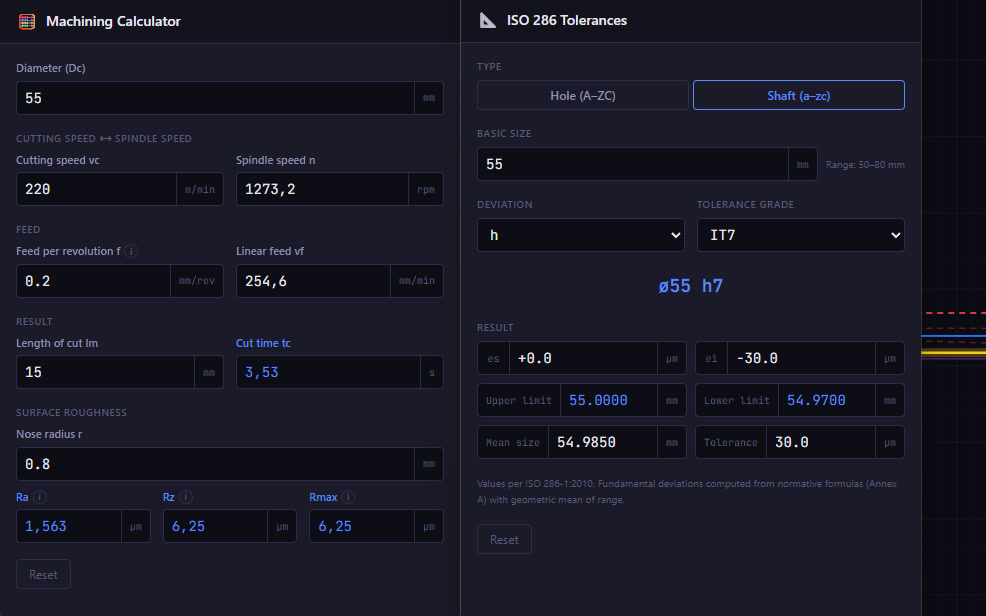
ISO Tolerances & Machining Calculator
Quick calculation of ISO tolerances, cutting speeds and surface finish — without leaving your program.
Toolpath Export to DXF
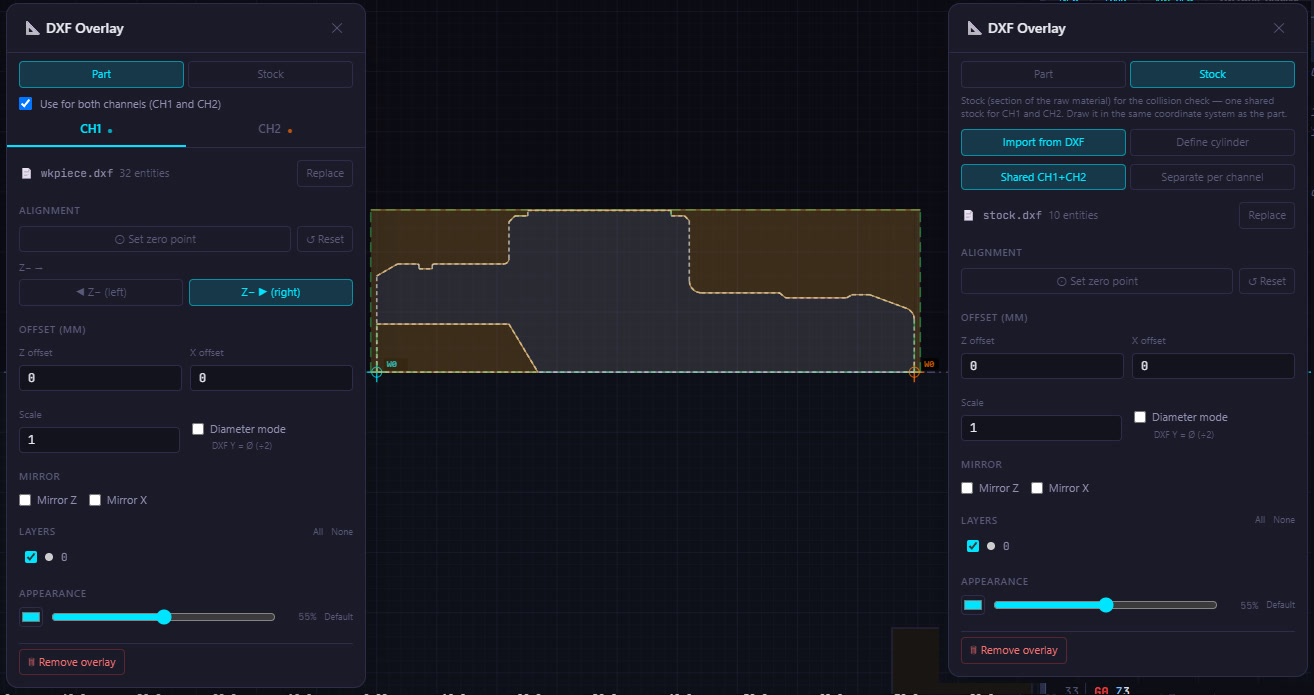
Simulated toolpaths can be exported to DXF, with layers automatically named by motion type or tool used. Ideal for verification, documentation, or further processing in a CAD system.
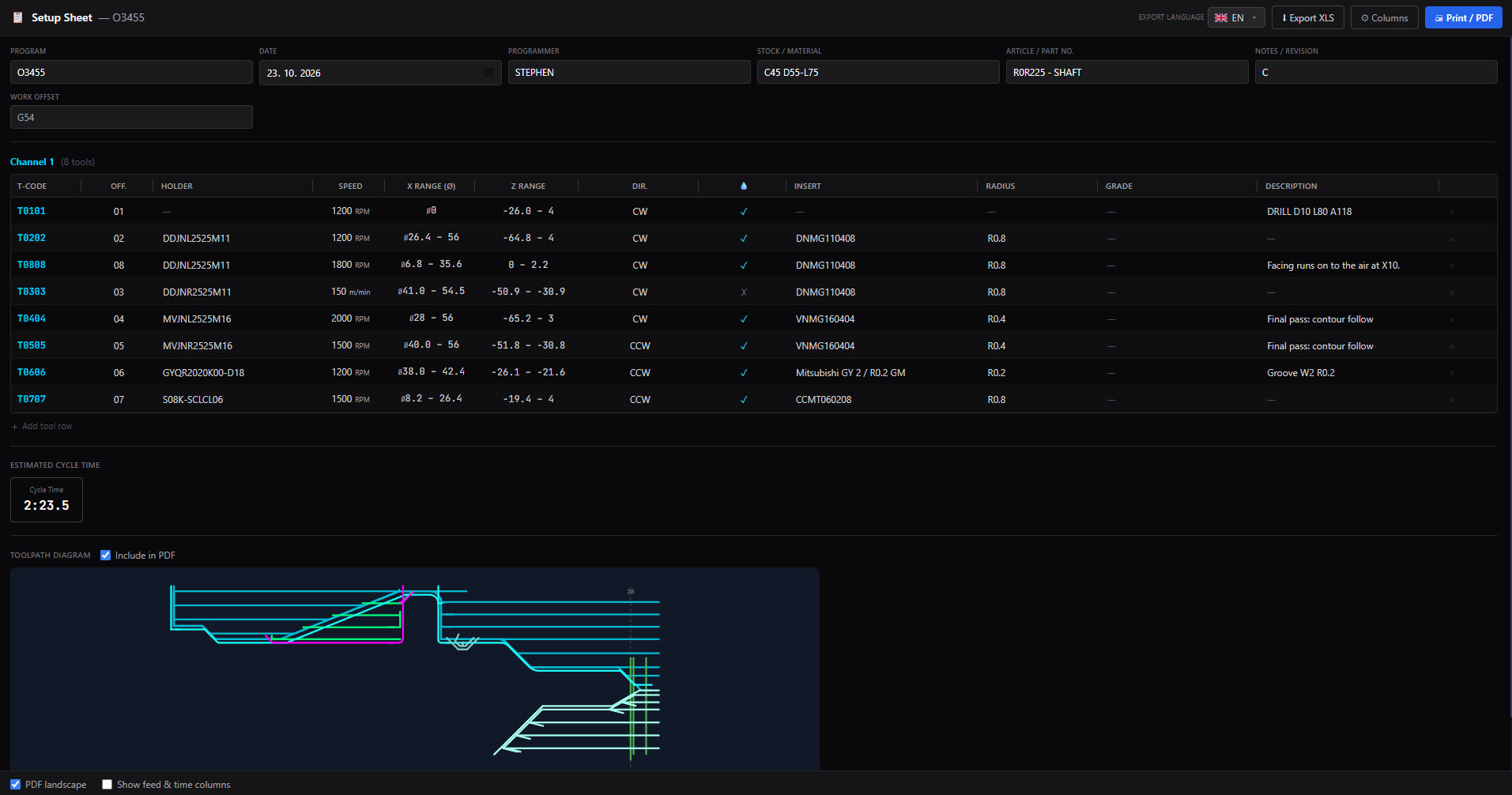
Setup Sheet Generation
A clear setup sheet with a tool table and graphical toolpath diagram is generated automatically straight from the simulation, eliminating manual re-entry into a separate document.
Supported Control Systems
Fanuc, Siemens, Fagor, Okuma OSP, Mitsubishi, and Haas are among the supported control systems, so a single tool covers most of the machines on your shop floor.

Macro Programming

Complex programs. Fully understood.

MultiPath reads #variables, evaluates incremental values and handles IF/GOTO branches, arithmetic expressions and nested cycles. Variables are loaded automatically from the program — if not defined in the main program, you can enter them manually or load a subprogram and MultiPath will read them automatically.

MultiPath CNC Editor — dual-channel simulation with macro program
Macro Variables panel

# Variables

Full #variable control before simulation

Define variable values before you run. Switch between global scope — K1 and K2 share values — or independent scope where each channel has its own set.

  • Edit any #variable value before simulation starts
  • Global or independent scope per channel
  • Arithmetic expressions evaluated correctly
  • IF/GOTO branches followed with actual variable values
  • Undefined variables highlighted before you run
  • Reads variable values directly from program comments

G-Code Check

Catch errors at your desk, not at the machine

Automatic program analysis detects errors, warnings and unknown commands. Every issue is marked by severity — from critical collisions to informational messages.

CCritical — program must not run as-is
SSerious — likely to cause machine problems
MModerate — review recommended
IInfo — informational message
G-Code Check — 9 issues found
C
G1/G2/G3 motion after M5 without re-activating M3/M4
CH1 · N154
S
Tool T0400 called with offset 00 — correction disabled
CH1 · N418
M
Sync codes in wrong order: M116→M188
CH1+CH2 · N23
I
Motion to negative X: X-1.2 (below center in diameter mode)
CH1 · N60

EDITOR + SIMULATION + ANALYSIS

Every issue caught in the editor. None on the machine.

Dual-channel simulation, G-Code Check and direct edits in one window.

Play
Tool visibility control
Individual tools can be toggled directly in the simulation view — instantly isolate any tool path without editing the program.
Play
G-Code Check
Static analysis before execution. G-Code Check detects errors, conflicts, and warnings across four severity levels.
Play
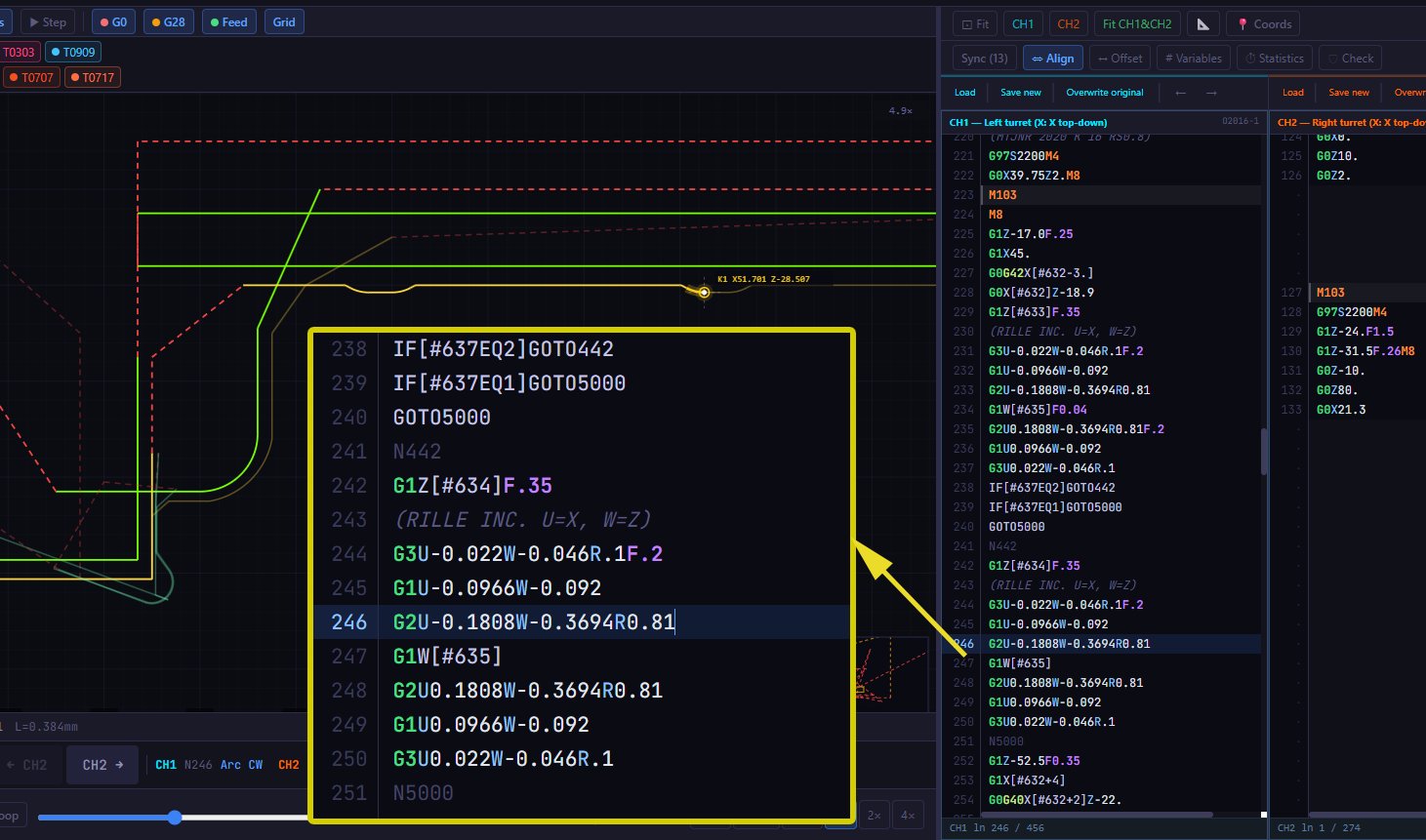
Click in simulation, jump to editor
Clicking a detail in the simulation instantly moves the editor cursor to the corresponding G-code line — no manual searching.
Play
Align — synchronized channel scrolling
Align mode links CH1 and CH2 scrolling to shared synchronization points — both channels move in step, making the timing relationship between turrets immediately visible.

Pricing

Choose a plan that suits you

Start free. Upgrade when you need the full dual-channel experience.

Free
Free
forever · no credit card
  • Single-channel simulation / editing
  • Dual-channel simulation
  • Machine preset configuration
  • Machining time statistics
  • Fanuc Macro B variables
  • Dual-channel simulation / editing
Download Free
Monthly
18
per month · cancel anytime
  • Dual-channel simulation / editing
  • G-Code Check
  • G-code Offset & Mirror
  • Sync M-code visualization
  • Always latest version
Buy Monthly
Lifetime
300
one-time · pay once
  • Everything in Annual
  • All future updates included
  • License transfer (1×/year)
  • Early access to new features
Buy Lifetime

All prices excl. VAT · Need multiple seats? Contact us.

Fullscreen

Simultaneous dual-channel simulation in real time

MultiPath executes CH1 and CH2 channels in parallel — each with its own cursor, tool, and timeline. Synchronization barriers (M100 / WAITM) are evaluated dynamically: if the channels fail to meet at the correct point, the simulation stops and pinpoints where. No dry run on the machine, no surprises.

  • Parallel CH1 + CH2 execution with independent cursors and tool tracking
  • Dynamic evaluation of M100 / WAITM synchronization barriers
  • Instant stop + pinpoint on sync mismatch — catch issues before the machine does

Free Trial

Try MultiPath on your own G-code

Single-channel simulation — free, no registration required.

v1.2.0 · Windows 10/11 · x64 · ~50 MB

1. Smluvní strany

Tyto licenční podmínky („Podmínky") upravují práva a povinnosti mezi společností ANARTECH („Poskytovatel") a osobou, která získala licenci k používání softwaru MultiPath CNC Editor („Software").

2. Udělení licence

Poskytovatel uděluje nevýhradní, nepřenosnou licenci k instalaci a používání Softwaru na jednom zařízení, v rozsahu odpovídajícím zakoupenému plánu. Licence neopravňuje k dalšímu prodeji, sublicencování ani sdílení.

3. Povolené použití

Software je určen k simulaci, ověřování a ladění CNC G-kódu včetně vícekanálových programů. Povoleno je komerční i nekomerční použití.

4. Omezení

Uživatel nesmí:

5. Aktivace a zařízení

Software je aktivován licenčním klíčem a vázán na jedno zařízení. Přesun licence na jiné zařízení je možný kontaktováním podpory. Plán Doživotní umožňuje přesun 1× ročně bez poplatku.

6. Platby a předplatné

Předplatné se automaticky neobnovuje. Platby jsou nevratné, pokud není dohodnuto jinak. Poskytovatel může zablokovat přístup k Softwaru při nezaplacení předplatného.

7. Aktualizace

Plány Měsíční a Roční zahrnují aktualizace po dobu platného předplatného. Plán Doživotní zahrnuje všechny budoucí aktualizace bez omezení.

8. Duševní vlastnictví

Software a všechny jeho součásti jsou výhradním vlastnictvím ANARTECH. Tyto Podmínky nepřevádějí žádná vlastnická práva k Softwaru ani jeho zdrojovému kódu.

9. Omezení odpovědnosti

Software je poskytován „tak jak je". ANARTECH nenese odpovědnost za škody vzniklé jeho použitím, ztrátu dat ani přerušení výroby. Celková odpovědnost je omezena na výši sumy zaplacené za licenci v posledních 12 měsících.

Software je výhradně nástrojem pro simulaci a ověřování G-kódu. ANARTECH nenese odpovědnost za žádné škody na CNC strojích, zařízeních, nástrojích, obrobcích ani jiných fyzických aktivech způsobené spuštěním G-kódových programů vytvořených, ověřených nebo upravených pomocí Softwaru. Za správnost a bezpečnost G-kódu před jeho spuštěním na reálném stroji odpovídá výhradně uživatel.

10. Ukončení

Licence zaniká uplynutím předplaceného období bez obnovení nebo porušením těchto Podmínek. Po ukončení je uživatel povinen ihned přestat používat Software.

11. Rozhodné právo

Tyto Podmínky se řídí právem Slovenské republiky. Spory budou řešeny před příslušnými soudy Slovenské republiky. Slovenská verze Podmínek je právně závazná.

1. Vertragsparteien

Diese Lizenzbedingungen („Bedingungen") regeln die Rechte und Pflichten zwischen ANARTECH („Anbieter") und der Person, die eine Lizenz für die Software MultiPath CNC Editor („Software") erworben hat.

2. Lizenzerteilung

Der Anbieter gewährt eine nicht-exklusive, nicht übertragbare Lizenz zur Installation und Nutzung der Software auf einem Gerät, entsprechend dem erworbenen Plan. Die Lizenz berechtigt nicht zum Weiterverkauf, zur Unterlizenzierung oder zur gemeinsamen Nutzung.

3. Zulässige Nutzung

Die Software ist für die Simulation, Überprüfung und Fehlersuche von CNC-G-Code bestimmt, einschließlich mehrkanaliger Programme. Kommerzielle und nicht-kommerzielle Nutzung ist gestattet.

4. Einschränkungen

Der Nutzer darf nicht:

5. Aktivierung und Gerätebindung

Die Software wird über einen Lizenzschlüssel aktiviert und an ein Gerät gebunden. Die Übertragung der Lizenz auf ein anderes Gerät ist durch Kontaktaufnahme mit dem Support möglich. Der Lebenslang-Plan erlaubt eine Übertragung pro Jahr ohne zusätzliche Kosten.

6. Zahlungen und Abonnements

Abonnements verlängern sich nicht automatisch. Zahlungen sind nicht erstattungsfähig, sofern nicht anders vereinbart oder gesetzlich vorgeschrieben. Der Anbieter kann den Zugang zur Software bei Nichtzahlung sperren.

7. Updates

Die Pläne Monatlich und Jährlich umfassen Updates während des aktiven Abonnementzeitraums. Der Lebenslang-Plan umfasst alle zukünftigen Updates ohne Einschränkung.

8. Geistiges Eigentum

Die Software und alle ihre Bestandteile sind ausschließliches Eigentum von ANARTECH. Diese Bedingungen übertragen keinerlei Eigentumsrechte an der Software oder ihrem Quellcode.

9. Haftungsbeschränkung

Die Software wird „wie besehen" bereitgestellt. ANARTECH haftet nicht für Schäden, die aus der Nutzung entstehen, für Datenverlust oder Produktionsunterbrechungen. Die Gesamthaftung ist auf den in den letzten 12 Monaten für die Lizenz gezahlten Betrag begrenzt.

Die Software ist ausschließlich ein Werkzeug zur Simulation und Überprüfung von G-Code. ANARTECH übernimmt keine Haftung für Schäden an CNC-Maschinen, Geräten, Werkzeugen, Werkstücken oder sonstigen physischen Gütern, die durch die Ausführung von G-Code-Programmen entstehen, die mit der Software erstellt, geprüft oder bearbeitet wurden. Der Nutzer ist allein verantwortlich für die Prüfung der Korrektheit und Sicherheit des G-Codes vor dem Einsatz an realen Maschinen.

10. Kündigung

Die Lizenz endet mit Ablauf des Abonnements ohne Verlängerung oder bei Verstoß gegen diese Bedingungen. Nach Beendigung muss der Nutzer die Nutzung der Software unverzüglich einstellen.

11. Anwendbares Recht

Diese Bedingungen unterliegen dem Recht der Slowakischen Republik. Streitigkeiten werden vor den zuständigen Gerichten der Slowakischen Republik verhandelt. Die slowakische Fassung der Bedingungen ist rechtsverbindlich.

1. Strony umowy

Niniejsze warunki licencyjne („Warunki") regulują prawa i obowiązki pomiędzy ANARTECH („Dostawca") a osobą, która uzyskała licencję na oprogramowanie MultiPath CNC Editor („Oprogramowanie").

2. Udzielenie licencji

Dostawca udziela niewyłącznej, niezbywalnej licencji na instalację i korzystanie z Oprogramowania na jednym urządzeniu, zgodnie z wykupionym planem. Licencja nie upoważnia do odsprzedaży, sublicencjonowania ani współdzielenia.

3. Dozwolone użytkowanie

Oprogramowanie jest przeznaczone do symulacji, weryfikacji i debugowania kodu G CNC, w tym programów wielokanałowych. Dozwolone jest użytkowanie komercyjne i niekomercyjne.

4. Ograniczenia

Użytkownik nie może:

5. Aktywacja i powiązanie z urządzeniem

Oprogramowanie jest aktywowane kluczem licencyjnym i powiązane z jednym urządzeniem. Przeniesienie licencji na inne urządzenie jest możliwe po skontaktowaniu się z pomocą techniczną. Plan Dożywotni umożliwia jedno przeniesienie w roku bez dodatkowych opłat.

6. Płatności i subskrypcje

Subskrypcje nie odnawiają się automatycznie. Płatności nie podlegają zwrotowi, chyba że uzgodniono inaczej lub wymagają tego przepisy prawa. Dostawca może zawiesić dostęp do Oprogramowania w przypadku braku płatności.

7. Aktualizacje

Plany Miesięczny i Roczny obejmują aktualizacje w trakcie aktywnego okresu subskrypcji. Plan Dożywotni obejmuje wszystkie przyszłe aktualizacje bez ograniczeń.

8. Własność intelektualna

Oprogramowanie i wszystkie jego elementy stanowią wyłączną własność ANARTECH. Niniejsze Warunki nie przenoszą żadnych praw własności do Oprogramowania ani jego kodu źródłowego.

9. Ograniczenie odpowiedzialności

Oprogramowanie jest dostarczane „w stanie, w jakim się znajduje". ANARTECH nie ponosi odpowiedzialności za szkody wynikające z jego użytkowania, utratę danych ani przerwy w produkcji. Łączna odpowiedzialność jest ograniczona do kwoty zapłaconej za licencję w ostatnich 12 miesiącach.

Oprogramowanie jest wyłącznie narzędziem do symulacji i weryfikacji kodu G. ANARTECH nie ponosi odpowiedzialności za żadne szkody wyrządzone maszynom CNC, urządzeniom, narzędziom, przedmiotom obrabianym ani innym aktywom fizycznym powstałe w wyniku wykonania programów G-code stworzonych, zweryfikowanych lub zmodyfikowanych przy użyciu Oprogramowania. Użytkownik ponosi wyłączną odpowiedzialność za sprawdzenie poprawności i bezpieczeństwa kodu G przed jego uruchomieniem na rzeczywistej maszynie.

10. Rozwiązanie

Licencja wygasa wraz z upływem okresu subskrypcji bez odnowienia lub w przypadku naruszenia niniejszych Warunków. Po rozwiązaniu użytkownik jest zobowiązany do niezwłocznego zaprzestania korzystania z Oprogramowania.

11. Prawo właściwe

Niniejsze Warunki podlegają prawu Republiki Słowackiej. Spory będą rozstrzygane przez właściwe sądy Republiki Słowackiej. Wersja słowacka Warunków jest prawnie wiążąca.